FireControl cut files for your CrossFire, made in the browser
Import a DXF or SVG, trace a picture, or draw the part. CutArc adds kerf, lead-ins and cut order, then writes a program for Langmuir FireControl with the probe sequence, THC start points and program speed line already in place.
Nothing to install. Start designing without signing up; a free account generates and downloads G-code for personal use, 25 files a month. Plans
- 1
(v1.6-af)Version comment FireControl checks on line 1 - 8 lines not shown
- 10
G20 (Units: inches)Inches here, or millimetres if you prefer - 11
G90 (Absolute positioning) - 12
G94 (Feed per minute) - 1 line not shown
- 14
H0Machine controller holds Z, ready to probe - 5 lines not shown
- 20
G0 X2.7559 Y1.5748Rapid to the 20 mm hole - 3 lines not shown
- 24
G38.2 Z-5 F100Probe seek down - 25
G38.4 Z0.5 F20Probe seek up - 26
G92 Z0 (Set Z reference)Zero Z on the plate - 1 line not shown
- 28
G0 Z0.1496 (Pierce height) - 1 line not shown
- 30
M3Torch fires - 31
G4 P0.5 (Pierce delay) - 32
G1 Z0.0591 F49.2126 (Cut height) - 1 line not shown
- 34
H1THC start point: height control takes over - 35
G3 X1.9685 Y1.5748 I-0.3937 J0 F98.4252The hole, written as two half circles - 36
G3 X2.7559 Y1.5748 I0.3937 J0 F98.4252 - 1 line not shown
- 38
H0Controller takes Z back - 1 line not shown
- 40
M5Torch off - 36 lines not shown
- 77
M30 - 78
(PS98.4252)Program speed comment, always the last line
What FireControl needs, and what CutArc writes
Langmuir publishes a short guide for anyone writing a post processor for FireControl. The left column is what that guide asks for. The right column is what the Langmuir FireControl preset in CutArc puts in your file.
| Langmuir's guide asks for | CutArc writes |
|---|---|
A version comment on the first line, (v1.6-af) or (v1.6-sc) | (v1.6-af) as line 1 |
H0 in the preamble, so the machine controller has the Z axis for probing | H0 after the units and positioning lines, and again before every probe |
The height-sensing probe before a pierce: G38.2 down, G38.4 up, then G92 Z0 | The same three lines before every pierce. Choose millimetre output and the distances and feeds are converted |
H1 once the torch has fired, paused and moved to cut height, and H0 again before M5 | In that order around every cut. H1, H0, M3 and M5 each sit on a line of their own with no comment attached |
A program speed comment such as (PS100) as the last line | The program's cutting feed, in the program's units, as the last line |
| Circles broken into two or more arcs | Every full circle is written as two half circles |
| No more than four digits after the decimal point | Four in inches, three in millimetres |
Source: Post Processing for FireControl, Langmuir Systems. The guide also mentions an optional springback offset after probing. CutArc does not write one.
From a drawing to a file FireControl can load
The walkthrough in the editor takes you through these on a small sample plate. They are the same five steps for your own part.
Bring in the part
Import a DXF or SVG, trace a photo or logo, set lettering in a cutting font, or draw it with the shape tools. Check the size on the sheet before you go on.
Choose Langmuir FireControl
Open Controller and pick Langmuir FireControl. That one choice sets the torch, THC and probe commands, the start and end of the program, and the
.tapfile extension.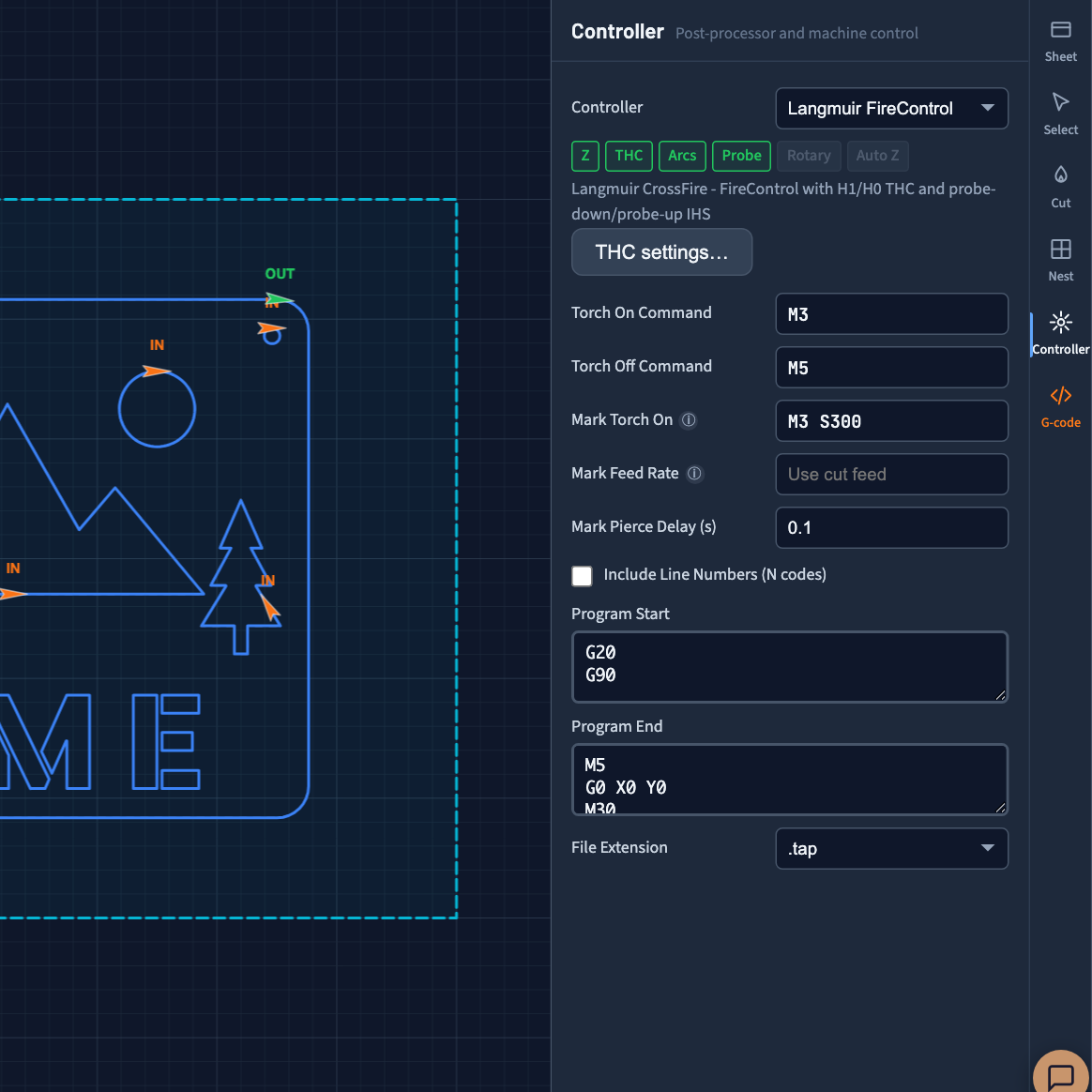
The Controller panel with the FireControl preset selected. Enter your cut settings
Set the sheet, material and thickness. Then check feed rate, pierce delay, pierce and cut heights, kerf and lead-ins against the cut chart for your plasma cutter and consumables. Confirm that holes cut before the outline around them.
Generate, check and download
Generate the G-code. The design checks list anything that needs a look, and Preview G-code plays back the exact file you are about to download. Then download the
.tapfile.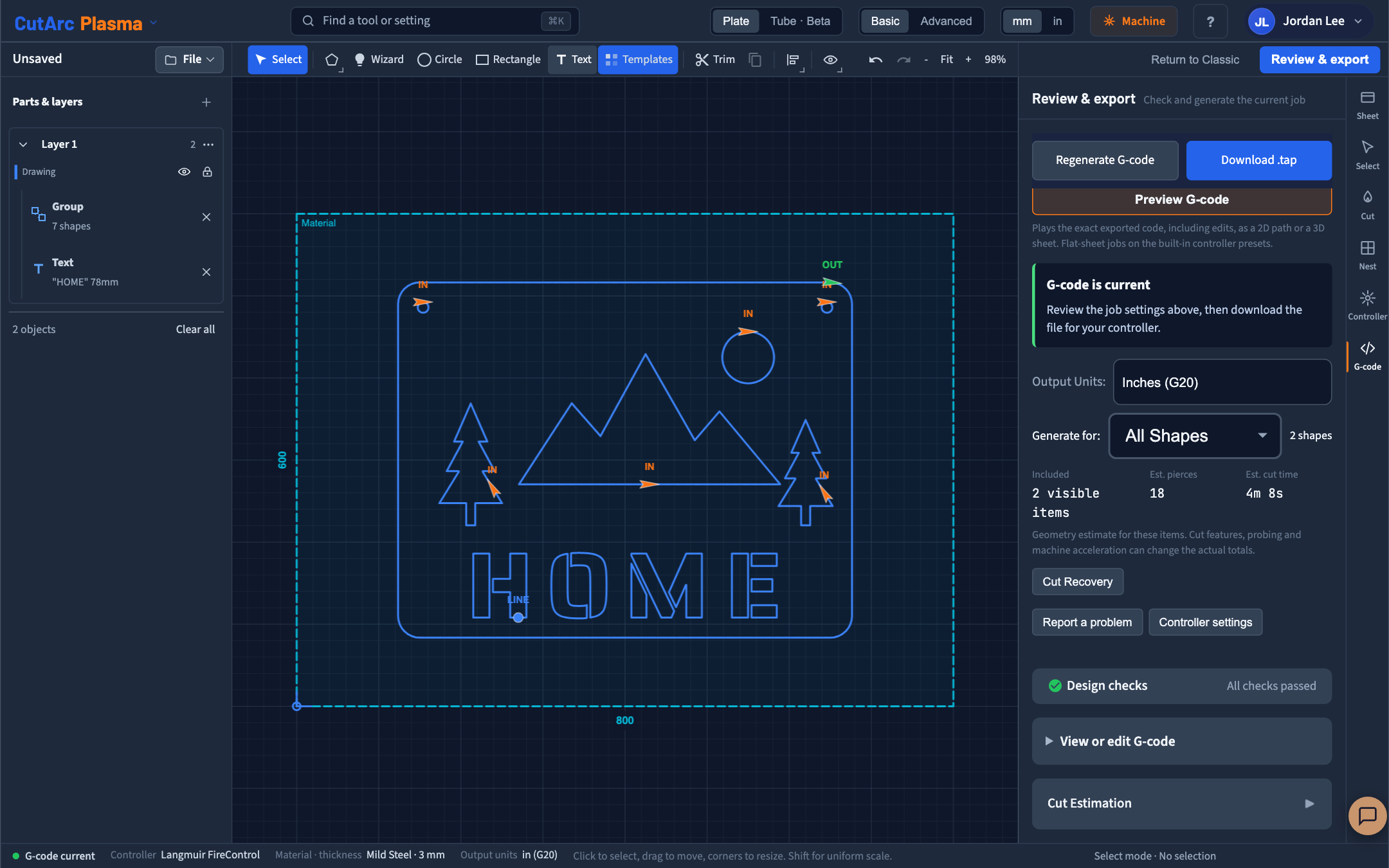
A sign ready to download: controller Langmuir FireControl, output in inches, design checks passed. Load it in FireControl
Look at the program in FireControl's visualizer and check its size and origin against your material. Follow Langmuir's dry run procedure before you cut. Langmuir's FireControl guide covers the table side.
How the FireControl output is checked
You are trusting a file with your torch and your material, so here is exactly what has been checked and what has not.
Checked on every change to CutArc
- 36 jobs are generated by the editor's own code and replayed through the G-code parser from Langmuir's published controller firmware. A file that parser rejects stops the release.
- Those jobs cover inch and millimetre output, both cut directions, lead-ins, overcut, grouped parts, common-line and chain cutting, small holes, tabs and marking.
- Each one is also checked for the version line, the
H0andH1order, and the program speed line.
Not done yet
- We have not cut these files on a CrossFire ourselves. The checks above are software checks.
- There is no springback offset after the probe.
- CutArc does not know your cutter. Feed, heights and pierce delay come from your cut chart.
Next to Fusion 360 and SheetCAM
Langmuir supports post processors for two programs, Autodesk Fusion 360 and SheetCAM. Both go much deeper than CutArc in their own areas. CutArc is a different kind of tool: a 2D drawing-to-cut-file editor that opens in a browser tab.
It suits you if you start from a DXF, an SVG, a photo or some lettering rather than a 3D model, and you want kerf, lead-ins, cut order and the FireControl file on one screen without installing anything. If you design parts in 3D, stay with Fusion. If SheetCAM already does what you need, stay with SheetCAM.
What it costs
The FireControl preset is in both plans.
Free
For personal use. The full design tools, DXF, SVG and image import, image trace, every controller preset, unlimited G-code generation and 25 G-code downloads a month.
Pro Commercial
Unlimited G-code downloads, SVG and DXF export, true-shape nesting, common-line and chain cutting, the desktop app, and a commercial license.
Questions
Is CutArc made or endorsed by Langmuir Systems?
No. CutArc is independent software. Langmuir Systems supports post processors for Autodesk Fusion 360 and SheetCAM. CutArc's FireControl preset follows Langmuir's published post-processing guide.
Which tables does the FireControl preset work with?
Tables that run FireControl. Older CrossFire tables that run Mach3 need a different setup.
My table has no torch height control. Can I still use it?
Yes. Switch THC off in THC settings. The file is then written without THC start points, and the design check tells you so before you download.
Inches or millimetres?
Either. Draw in the units you like and choose the output units when you generate. The probe sequence and feed rates are converted to match.
What file do I get?
A plain-text G-code file ending in .tap. Open it in any text editor to read exactly what will run, then load it in FireControl.
What does it cost?
Designing and generating G-code is free for personal use, with 25 G-code downloads a month. Pro Commercial is $14.99 a month or $99.99 a year and adds unlimited downloads, SVG and DXF export, true-shape nesting and a commercial license.
Has CutArc been cut on a CrossFire?
Not by us yet. FireControl files are checked in software on every change to CutArc. Until we have cut on the table ourselves, treat your first file like any new post: load it, check FireControl's visualizer, do a dry run, then cut a test piece.
Other controllers: GRBL, JDs Garage, Mach3 and Mach4, StarFire, or every preset in CutArc.
Try it on a small plate first
The walkthrough opens beside the editor with a 100 × 60 mm sample part.