Cut files for StarFire SF-2100 and SF-2300 controllers, made in the browser
Import a DXF or SVG, trace a picture, or draw the part. CutArc adds kerf, lead-ins and cut order, then writes the short, comment-free program a StarFire controller expects: M07 and M08 around every cut, two-digit codes, and a file name short enough for the controller.
Nothing to install. Start designing without signing up; a free account generates and downloads G-code for personal use, 25 files a month. Plans
- 1
G21Millimetres here, or inches if you prefer - 2
G90 - 3
G92 X0 Y0Reference point, set at the very start - 4
G40Kerf is already worked into the path - 5
G00 X70 Y40Rapid to the 20 mm hole, in two-digit codes - 6
M07Pierce cycle: the controller lowers the torch, fires and times the pierce - 7
G03 X50 Y40 I-10 J0 F2500The hole, written as two half circles - 8
G03 X70 Y40 I10 J0 F2500 - 9
M08Cut-stop cycle - 10
G00 X55.902 Y5.902On to the outline - 11
M07 - 12
G01 X57.402 Y8.5 F2500Lead-in - 13
G02 X60 Y10 I2.598 J-1.5 F2500 - 14
G01 X110 Y10 F2500 - 15
G01 X110 Y70 F2500 - 16
G01 X10 Y70 F2500 - 17
G01 X10 Y10 F2500 - 18
G01 X60 Y10 F2500 - 19
M08 - 20
M02Program end
What the StarFire manuals ask for, and what CutArc writes
StarFire controllers read a small dialect of G-code, set out in the programming chapter of their manuals. The left column is from that chapter. The right column is what the StarFire preset in CutArc puts in your file.
| The manuals ask for | CutArc writes |
|---|---|
The reference point set with G92 at the very beginning | G92 X0 Y0 straight after the units and G90 |
M07 and M08 as the pierce and cut-stop cycles. The controller lowers the torch, fires, waits for the arc, times the pierce and runs height control itself | One M07 before every cut and one M08 after it. No pierce dwell and no Z moves in the file |
| No comments: a character the controller does not expect stops the program | No comments and no blank lines |
Codes written with two digits, such as G00 and M07 | Two-digit codes throughout |
| File names of at most 12 characters, extension included | A short name such as C21117.TXT: the number of shapes, then the month and day |
Arcs with G02 and G03 | Arcs as drawn. If your controller reports an arc error, the second preset, StarFire - No Arcs, writes every curve as short straight lines |
Source: chapter 6 of the SF-2100C, SF-2100 series, SF-2200H and SF-2300S manuals, Beijing Starfire Control Technology.
From a drawing to a file the controller will load
The same five steps apply to any part. Try them first on something small.
Bring in the part
Import a DXF or SVG, trace a photo or logo, set lettering in a cutting font, or draw it with the shape tools. Check the size on the sheet before you go on.
Choose StarFire
Open Controller and pick StarFire (SF-2100 / SF-2300). That sets
M07andM08, the start and end of the program, the.TXTextension and the short file name.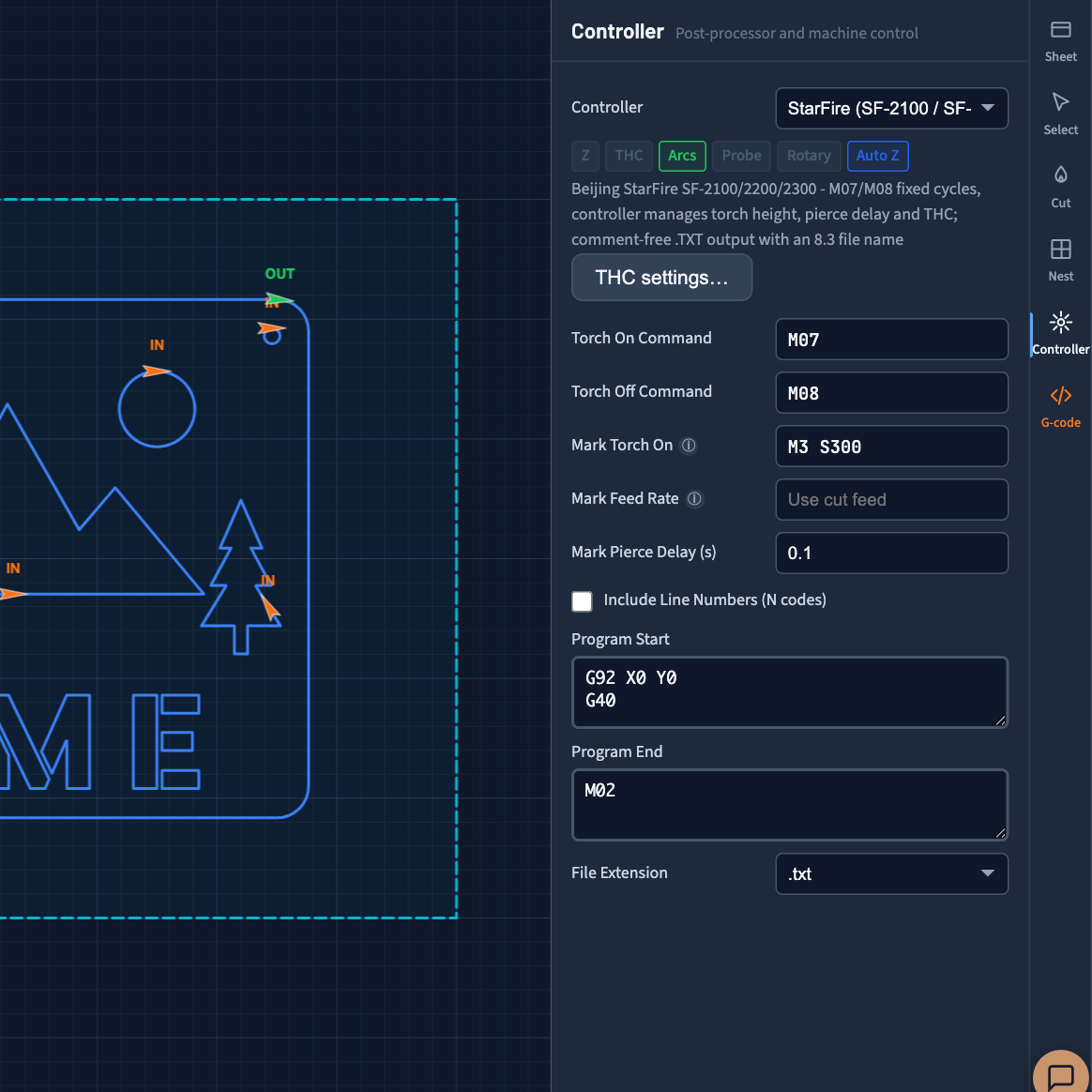
The Controller panel with the StarFire preset selected. Enter your cut settings
Set the sheet, material and thickness, then the cut speed, kerf and lead-ins from the cut chart for your plasma cutter and consumables. Pierce time and torch heights are set on the controller, not in the file. Confirm that holes cut before the outline around them.
Generate, check and download
Generate the G-code. The design checks list anything that needs a look, and Preview G-code plays back the exact file you are about to download. Then download the
.TXTfile.Load it on the controller
Copy the file to the controller the way you normally load programs, and check its size and origin against your material before you cut.
How the StarFire output is checked
You are trusting a file with your torch and your material, so here is exactly what has been checked and what has not.
Checked on every change to CutArc
- 16 jobs are generated by the editor's own code with both StarFire presets and checked against the word and code tables in the manuals: every letter, every G code and every M code has to be one the controller lists.
- Those jobs cover millimetre and inch output, stationary and rolling pierces, and grouped and separate parts.
- Each one is also checked for the order of the first four lines, one
M07and oneM08per cut, no dwell and no Z moves. The file name is checked to fit in 12 characters.
Not done yet
- There is no StarFire firmware we can run files through, so these are checks against the manuals, not against a controller.
- These are software checks. A preset being in CutArc does not mean it was physically tested on your machine.
- Pierce time, torch height and height control are set on the controller. CutArc cannot see or change them.
Where it fits
A StarFire controller runs the table and reads its programs from a file. CutArc makes that file in a browser tab, from drawing or importing the part through kerf, lead-ins and cut order to the program.
If you already have a CAM set-up you like, keep it. CutArc suits you if you start from a DXF, an SVG, a photo or some lettering and want a cut file without installing anything.
What it costs
Both StarFire presets are in both plans.
Free
For personal use. The full design tools, DXF, SVG and image import, image trace, every controller preset, unlimited G-code generation and 25 G-code downloads a month.
Pro Commercial
Unlimited G-code downloads, SVG and DXF export, true-shape nesting, common-line and chain cutting, the desktop app, and a commercial license.
Questions
Which StarFire controllers is this for?
The SF-2100, SF-2200 and SF-2300 series. The preset follows the programming chapter those manuals share.
The controller reports an arc error. What now?
Choose the second preset, StarFire - No Arcs. It writes every curve as short straight lines, for a controller that reports errors 21H or 22H on arcs.
Why is the file name so short?
The controller accepts at most 12 characters, extension included. CutArc names the file with the number of shapes and the date, for example C21117.TXT.
Where do I set pierce time and cut height?
On the controller. M07 starts its own pierce cycle, so the file carries no dwell and no Z moves.
Inches or millimetres?
Either. Draw in the units you like and choose the output units when you generate. Distances and feed rates are converted to match.
What does it cost?
Designing and generating G-code is free for personal use, with 25 G-code downloads a month. Pro Commercial is $14.99 a month or $99.99 a year and adds unlimited downloads, SVG and DXF export, true-shape nesting and a commercial license.
Other controllers: Langmuir FireControl, GRBL, JDs Garage, Mach3 and Mach4, or every preset in CutArc.
Try it on a small part first
Draw a plate with one hole, pick your controller, and read the file before you cut anything.